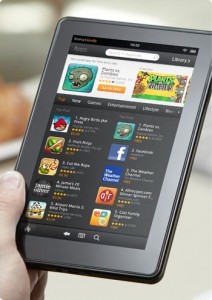
 Over the past several weeks several people have informed me that the most up to date reviews they were able to find regarding the Kindle Fire were a bit outdated, to say the least. Looking over the links I was provided, it definitely seems like there is still some misinformation floating around. This is mostly a result of failure to update after the performance patch, which did a great job of addressing complaints and ensures that new users won’t have nearly as many annoyances as they might have on launch day. In the interest of clarifying, here’s what I would say is worth knowing if trying to decide on a Kindle Fire purchase today:
Pros:
- Highly portable (noticeably lighter than any hardcover book I own)
- Durable (Check out Andrei’s scratch/drop test)
- Powerful for the $200 price
- ~8 Hour battery life (I average 7 hours with WiFi on and brightness at a comfortable level)
- Amazing video quality through Amazon Instant Video
- Seamless integration with Amazon Cloud Storage for Amazon Purchases
- Large, well-moderated App Store
- Access to Amazon’s Customer Service
- Easy WiFi Setup
Cons
- Only 8GB onboard storage (6GB or so available, with just over 1GB reserved for Apps)
- 2 Finger Touch screen not perfect for extended typing (not a netbook replacement)
- Back-lit screen not great for reading
- Some Kindle eReader functionality missing (collections, real page numbers, X-Ray)
- No Text to Speech (in Kindle Edition eBooks, though some apps may make up for this)
- No access to Android Marketplace by default
- Netflix video currently only allows SD streaming
- Limited Codec selection
Common Kindle Fire Software Complaints (Including Those Addressed)
Choppy navigationWiFi connectivity limitedOverly fast browsing/scrollingUnresponsive page turningNo Parental ControlsNo way to choose favoring of mobile sites- Unintuitive cloud integration for personal documents
Caroussel Logs Every Activity- Purchased Apps always present in Cloud view
- Silk Browser doesn’t live up to the hype
At this point, if you are interested in getting a Kindle Fire, I strongly recommend it. This isn’t exactly a surprise coming from me given earlier similar declarations even before the big patch that dealt with so many complaints, but it remains true. Read how to open NUMBERS file.
This is not an iPad killer. It might have an effect on Apple, and will almost certainly spur Amazon to more direct competition, but they’re devices intended for different purposes. If you want to watch movies, play Android games, access a wide variety of streaming content, and just generally consume media of various sorts, the Kindle Fire is the way to go. I certainly wouldn’t replace my Kindle eReader with one, nor would it work as even a basic netbook substitute in the way that an iPad could once you get used to it, but what it does do is well done.
This is just a short overview, of course, and I would be happy to elaborate on any and all of these points should you be interested. Let me know here or by email and I will either comment here or throw up an in-depth explanation as the situation demands.
Interesting article on DIY publishing using Ebooks via Amazon and Kindle:
http://thelonggoodread.com/2012/01/16/the-writer-who-made-millions-by-self-publishing-online/
Thanks for the update it was really informative.
What I am interested in as a person who has not yet purchased a Kindle Fire is your impressions of the device after having it a round for a couple of months. Do you think a year from now you will still be using it as much or is it going to end up in the drawer with all those other great ideas.
Steven,
That was exactly my plan when I bought it. Have some fun, review it, and pull it out as needed for those occasions when I both needed lightweight portable computing and remembered where I put it. It’s turned into a daily use device that comes out almost as often as my Kindle eReader.
Hard to say what will happen months down the line, but if I had to guess I would say that it will be a staple of life around the house. It fills that niche where I can play with or watch something on a lightweight portable device anywhere I want. The iPad came close, but it’s not nearly as comfortable over long periods and anything I want to do in terms of productivity is better done at a real PC anyway.
hi
I am thinking about buying a Kindle Fire but I have few questions:
– would this serve as a movie player for my kids in the car? I am about to buy one as well and it hit me that Fire should work as well. now, do I need two for two kids or is there a chance I mount it somehow in the middle so the screen is viewable from both back seats?
– is it loud enough or do I need it to connect to the car stereo?
– what’s the chance that a week after buying Fire there will be Fire 2 out? I’d like to have microphone, front camera and GPS… I know you will point me to iPad but these little components should not cost must so I guess next release will have them…
thanks
Sim
Sim,
-This would serve well as a movie player for the kids. While you probably couldn’t stream movies while driving in many cases, you would be able to download any purchased title to the tablet and play that way.
-The viewing angle is quite good, so one device for two kids would work so long as you can find a way to make it stable. There are a number of cases that allow you to stand it up, but I’m not sure that would be enough on a bumpy road or during braking. Possibly when combined with an inexpensive strip of velcro?
-Sound is decent, but unimpressive. I don’t know that I would go so far as hooking it up to car audio, but a small set of external speakers might be useful.
-It is pretty much inevitable that there will be other Kindle Fire tablets. We have indications that one may be out as early as this summer, though obviously that is just speculation right now. Cameras and GPS seem highly unlikely any time soon though. I would guess that the main differences in the next couple releases are larger screens and more powerful hardware. The mic is possible but I don’t know that a mic alone would be enough to hold out for, especially when it can’t even be confirmed.
Hope that helps!
I’m looking for a light weight notebook to be used for e-reading, email and as a journal on my international travel. Would the Kindle Fire meet my needs?
yes. thanks a lot for your comment.
Lilian,
I would say that the Kindle Fire is definitely a good option, but it depends on whether or not you will be doing extensive writing in that journal. There is technically a document writer and I’m certain that there are loads of journal apps out there, but typing just isn’t as quick without a physical keyboard. If this doesn’t matter for you, go Kindle Fire. For lots of writing, bring at least a netbook or find a tablet that will allow you to hook up a USB keyboard.