To view ePub of PDF files on your Amazon Kindle normally you would need to use Amazon email conversion service (either free of $0.10 per document) or you could convert documents on your PC using Mobipocket Creator. Well, not anymore…
Jesse from “Massively Parallel Procrastination” blog has created a Savory hack that adds almost native support for these formats to your Amazon Kindle. Installing this hack does two things:
- It becomes possible to download PDF and ePub files from Kindle browser (normally all unsupported file-types are blocked)
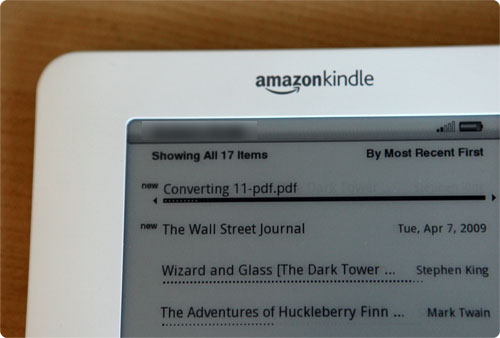
- One PDF or ePub file is dropped into /documents folder background conversion process is started automatically and after some time a converted document appears in it’s place.
I installed and tested it and it took just under 2 minutes to convert project Gutenberg version of “Alice’s Adventures in Wonderland”. There were some formatting flaws but overall book converted well.
This hack is fully reversible. There is an uninstaller provided. However it should be noted that because of the way uninstaller currently works, if you have other hacks installed (like unicode hack or screensaver hack) it can potentially partially revert these as well if they were installed after Savory. So for now it’s safer to uninstall in the reverse order of how you installed hacks.
As with all other Kindle hacks it should be used with care because although tested by many people (myself included) it can potentially brick your device. Also having this hack installed will prevent official Amazon updates from installing so you’ll need to uninstall it and the install Amazon update manually.
This makes Kindle even more PC-independent than it was to begin with. And this is good. Personally I believe that PC-independent gadgets are the way of the future. Just look at how successful iPhone is (I only need to tether mine to upload new audiobooks and flash new firmware). This is because most people don’t wan’t anymore just to use computers for the sake of using computers but to get done things they need done in their everyday lives and the simpler – the better.
Learn how to open PDF file.
So does Savory work for PDFs that you load on it through the USB or will it only be triggered on PDFs that are acquired through the Kindle browser?
It works either way.
Does this work on the international edition?
can Savory work on Chinese ebook with ePub format?
Can Savory work on Chinese EPUb file under UFH 0.3? if not, have other solution for EPub file?
It might or it might not. You’ll need to test. You can convert the file with PC version of Savory and see if it opens properly on Kinlde with UFH. If it does then you can consider installing savory.
could you direct me which font file is for Chinese file?Because I can not read my ebook with Chinese.
update_ufh_Arial_Unicode_install-k2.bin.zip
update_ufh_gnufreefont_install-k2.bin
update_ufh_droid_styles_sans_install-k2.bin
Excellent tip! Will this work on books I’ve bought from Waterstones (The Adobe Digital Rights ones)
Do you know if there is a version of the Savory Document Processor that is compatable with Kindle 3 (3G+Wi-Fi)?
I just got a Kindle for Christmas. I do not know anything about them. One of my first questions is can I download books from the library?
MAV: I’m new to this myself. But from what I’ve seen there are only two issues with downloading books from anywhere:
1) If it’s for a Kindle, it has to be in .azw format. .mobi or .prc will also work. You just rename the file with a .azw extension instead, right-click on it, and say open with “Kindle.” The three formats are all pretty much the same thing, I gather.
2) If it’s a file with DRM, and I believe many library books are, then you have to go through whatever procedure it requires. The library where you’d like to download will, no doubt, have instructions.
If I’m wrong, I hope the more knowledgeable folks here will correct me!
I received a Kindle for Christmas 2011 but now realise that I can’t download from my local library (Australia) which is what I wanted it for. Unfortunately it is typical of these products so that you purchase from them ONLY. Shame on you :(
@deb well what did you expect? You can’t load physical books onto it, and most australian libraries don’t provide ebooks.
Deb,
While I can’t say anything directly about Australian libraries, Amazon has in recent months worked to get some very easy to use library support through OverDrive. OverDrive is the company that handles basically any US library I’ve encountered so far, but I honestly don’t know if they would be available in AU. Even if they were, it would be up to the library to both subscribe to their service and purchase eBooks to lend.
You might want to contact your local librarians to at least register an interest. The only way to get these sorts of services is by making sure that the people providing them know there is a demand.
so I’m curious, has it bricked anyones Kindle yet? I have many ePub books that I’d like to put on my Kindle, but just noticed I can’t…..I would like to hear more feedback before I put it on my Kindle though.
anyone knows if this hack works on kindle touch? i cant download pdf through it, besides the “native support” sucks, and there are some pdf files that i cant even see some letters, kindle randomly erases them out. id like to give this hack a try, but i dont know whether its compatible
An ebook reader that doesn’t support epub is like a web browser that read html.
A second problem for Amazon is that you need special software installed on your computer to be able to download their books. For Windows this apparently it makes a mess of the registry but if you use Linux the software is not even available.
Onyx sound like the best e-readers with the most open style of OS.
whoops: should have said “a web browser that CANNOT read html”
Hello Steve.
I can not agree with you. At first, Amazon makes Kindle to read its content (books which were bought on Amazon store). And Amazon has the biggest list of books.
There is no problem with any installation. You can read any kindle book in clouds using any browser. Also you can buy a book directly from your Kindle. You do not need to use your PC.
About epub standard – you can simply convert. Yes, I have to spend some time. But it is just a few seconds and it is affordable.
After reading this article and the comments it is still not clear to me if I will be able to read PROTECTED files supplied by, for example, libraries on Kindle, such as MobiPocket’s DRM (PRC) or Adobe’s DRM (Epub and PDF). I don’t really care if I need to use a PC to download the files from the library and then convert and transfer it to Kindle (A few minutes work to get several hours free reading). Anyone has a straight answer?
Tom,
My default answer would be to talk to somebody at your library of choice.
That’s not putting you off, it’s just become a complicated issue. At first, protected eBooks were off limits. After an agreement with OverDrive, most libraries became Kindle-compatible. Because of publisher unhappiness and competitor complaints about the way Amazon managed to route library patrons through the sales page for Kindle Books, it’s become difficult to say.
At most libraries I’ve dealt with you’d be able to access everything they have digital copies of. I can’t guarantee that will be your experience personally, but it has been mine.
I have a plethora of .epub files that I’ve uploaded to Cloud Drive. I guess I’m wary that my Kindle Fire will somehow be compromised with hacks, etc. What’s my best chance at getting these files from Cloud Drive to my Fire (converted to PDF)? Can I do the conversion on my PC and email the PDFs to my Kindle email address so they show in “Documents?”