UFHack is a hack for Amazon Kindle 2 (including the international version) and Amazon Kindle DX (including the international version) that allows replacing default Kindle fonts with different ones, including fonts that support broader range of characters like Cyrillic, Chinese, Japanese, etc. Hack comes in a form of manually installable patch and is fully reversible. Source code is included so you can customize the hack. If you do, please let me know and I’ll host or link to the modified version as I’m sure that one size doesn’t fit all.
This hack doesn’t work on Kindle 1 – check the link at the end of the page for alternate solutions.
Important!:
- Use this hack and instructions at your own risk after reading ALL OF THEM carefully! Although I tested it to the best of my ability on my own devices I can’t guarantee that it will work on yours and will not be responsible for any damage (including completely and irreversibly bricking your device) it may have caused!
- This hack works on Kindle 2 (incuding the international version) and DX. For Kindle 1 you’ll need a different one. If you are not sure which version you have it’s best not to mess with it all.
- Having this hack installed will cause installation of official Amazon.com updates to fail. This is normal. You’ll need to reverse the hack (see instuctions below), install the Amazon.com update manually and then reapply the hack.
In theory this hack should work with any version of Kindle software. However, I’ve only tested it with 2.5.2 and 2.5.3. I strongly advice you to update your Kindle to the latest software version before installing this hack. This is something you should be doing anyway.
Before installing this hack you will need to “jailbreak” your Kindle – see instructions below!
There are several versions of this hack. Functionally they are identical but they are prepacked with different sets of fonts:
- GNU FreeFont – this hack uses GNU Free Fonts that come with Linux and are free to redistribute. All font styles are preserved (serif, sans-serif, mono-spaced, bold and italic) but these fonts only support Latin, Cyrillic characters and some others (click here for full coverage data). So if you are only interested in Russian books – this is the way to go. Otherwise this patch will do you little good. Here are download links:
- Kindle 2 (serial number starts with B002) – update_ufh_gnufreefont_install-k2.bin
- Kindle 2 International (serial number starts with B003) – update_ufh_gnufreefont_install-k2i.bin
- Kindle DX (serial number starts with B004) – update_ufh_gnufreefont_install-kdx.bin
- Kindle DX International (serial number starts with B005) – update_ufh_gnufreefont_install-kdxi.bin
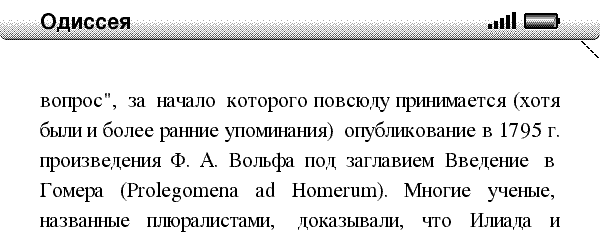
- GNU Free Fonts SansSerif (recommended for Cyrillic) – same fonts as before but SansSerif family is used instead of Serif. In my opinion it looks better. Bold and italic styles are preserved:
- Kindle 2 (serial number starts with B002) – update_ufh_gnufreefont_sans_install-k2.bin
- Kindle 2 International (serial number starts with B003) – update_ufh_gnufreefont_sans_install-k2i.bin
- Kindle DX (serial number starts with B004) – update_ufh_gnufreefont_sans_install-kdx.bin
- Kindle DX International (serial number starts with B005) – update_ufh_gnufreefont_sans_install-kdxi.bin
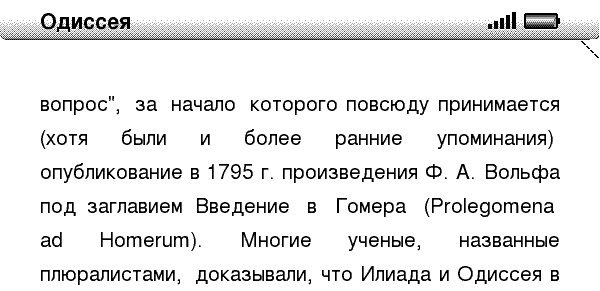
- Droid Fallback Fonts (recommened for Asian glyphs) – this hack uses open-source Droid fallback font that is part of Google Android platform. Unfortunately styles and typefaces are missing completely. You’ll only get regular Sans Serif. The upside is the broadest character support. It supports Cyrillic, Chinese, Japanese and a bunch of other languages. This font also looks very good on the Kindle screen (in my opinion way better than native Kindle fonts). This is the patch I currently have installed on my Kindle 2. Here are download links:
- Kindle 2 (serial number starts with B002) – update_ufh_droid_install-k2.bin
- Kindle 2 International (serial number starts with B003) – update_ufh_droid_install-k2i.bin
- Kindle DX (serial number starts with B004) – update_ufh_droid_install-kdx.bin
- Kindle DX International (serial number starts with B005) – update_ufh_droid_install-kdxi.bin
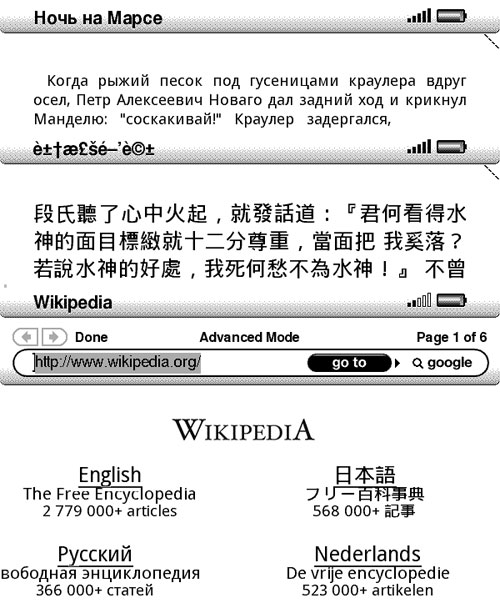
- Droid Fonts with Styles – Same fonts as above but all families and styles are there. However Asian characters are not supported:
- Kindle 2 (serial number starts with B002) – update_ufh_droid_styles_install-k2.bin
- Kindle 2 International (serial number starts with B003) – update_ufh_droid_styles_install-k2i.bin
- Kindle DX (serial number starts with B004) – update_ufh_droid_install-kdx.bin
- Kindle DX International (serial number starts with B005) – update_ufh_droid_install-kdxi.bin
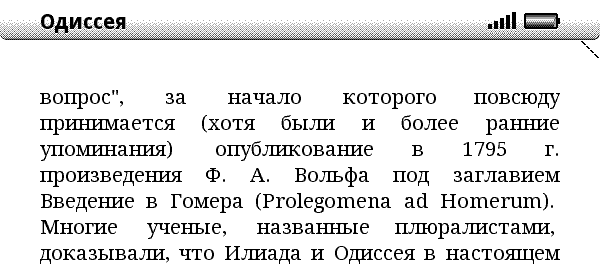
- Droid Fallback with Styles SansSerif – Same as above but Serif fonts are replaced with Sans Serif because I believe it is more readable on Kindle screen:
- Kindle 2 (serial number starts with B002) – update_ufh_droid_styles_sans_install-k2.bin
- Kindle 2 International (serial number starts with B003) – update_ufh_droid_styles_sans_install-k2i.bin
- Kindle DX (serial number starts with B004) – update_ufh_droid_sans_install-kdx.bin
- Kindle DX International (serial number starts with B005) – update_ufh_droid_sans_install-kdxi.bin
Installing the hack:
- Download appropriate jailbreak package for your Kindle:
- Kindle 2 (serial number starts with B002) – update_jailbreak_k2_install.bin
- Kindle 2 International (serial number starts with B003) – update_jailbreak_k2i_install.bin
- Kindle DX (serial number starts with B004) – update_jailbreak_k3_install.bin
- Kindle DX International (serial number starts with B005) – update_jailbreak_k3i_install.bin
- Connect your Kindle via USB cable and copy the jailbreak package into the root directory of Kindle drive
- Use menus to initiate manual update installation: Press “Home” to fo to the home screen, press “Menu” and select “Settings”, press “Menu” again and select “Update Your Kindle”, press the 5-way controller once more to confirm the update. If “Update Your Kindle” is disabled make sure that update version corresponds to your version of Kindle.
- The installer will run and report a failure. This is expected and normal. After your Kindle reboots it will be jailbroken and you would be able to install custom hacks (including UFH)
- If you have another version of Unicode Font Hack installed – uninstall it first (instructions can be found below). If you do not the fonts may not change.
- Download appropriate update file from one of the links above.
- Connect your Kindle 2/DX to your PC via USB cable.
- Copy *install*.bin file that corresponds the the desired font family and your device version into the root of your Kindle USB drive.
- Use menus to initiate manual update installation: Press “Home” to fo to the home screen, press “Menu” and select “Settings”, press “Menu” again and select “Update Your Kindle”, press the 5-way controller once more to confirm the update. If “Update Your Kindle” is disabled make sure that update version corresponds to your version of Kindle. For Kindle DX you should use _dx.bin files.
- Your Kindle Kindle 2/DX will switch through several update screens and then reboot.
- Once it reboots, you can test that the hack installed properly and works:
- First of all you should see apparent change in all of the fonts if you didn’t install browser-only update.
- press “Menu”, select “Settings”. In the bottom portion of the settings page you should see Kindle software version and “+ UFHack 0.3”.
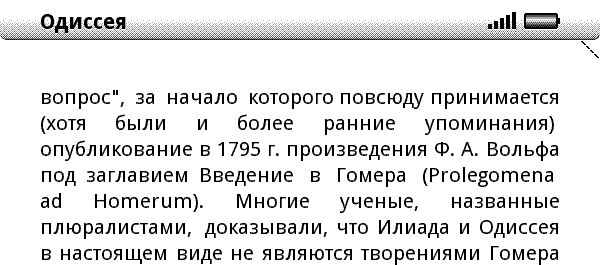
- Start web browser and open http://www.wikipedia.org/ – you should see Russian text in the bottom left rather than boxes with question marks. If you used droid patch – Japanese characters in the upper-left will also display.
- And of course you can now copy books in different languages and start reading them.
- Connect your Kindle Kindle 2/DX to your PC via USB cable and copy *.orig files from the root directory to a safe location. Normally you’ll not need these to reverse the hack but it’s good to keep a copy of these just in case.

Uninstalling the hack:
- Connect your Kindle 2/DX to your PC via USB cable.
- Download file that corresponds to your device and copy it to the root directory of your Kindle drive. It doesn’t matter if you have droid or liberation hack installed. The uninstaller would remove either one.
- Kindle 2 (serial number starts with B002) – update_ufh_uninstall-k2.bin
- Kindle 2 International (serial number starts with B003) – update_ufh_uninstall-k2i.bin
- Kindle DX (serial number starts with B004) – update_ufh_uninstall-kdx.bin
- Kindle DX International (serial number starts with B005) – update_ufh_uninstall-kdxi.bin
- If you have UFH 0.3 for Kindle 2.3 installed use these (old) uninstallers:
- Kindle 2 (serial number starts with B002) – update_ufh_uninstall-k2.bin (old)
- Kindle 2 International (serial number starts with B003) – update_ufh_uninstall-k2i.bin (old)
- Kindle DX (serial number starts with B004) – update_ufh_uninstall-kdx.bin (old)
- Kindle DX International (serial number starts with B005) – update_ufh_uninstall-kdxi.bin (old)
- If you have UFH 0.1 or 0.2 installed you should use the oldest uninstaller from one of the following links:
- Kindle 2 (serial number starts with B002) – update_ufh_uninstall-k2.bin (oldest)
- Kindle 2 International (serial number starts with B003) – update_ufh_uninstall-k2i.bin (oldest)
- Kindle DX (serial number starts with B004) – update_ufh_uninstall-kdx.bin (oldest)
- Optionally but highly recommended: use “Safely Remove Hardware” to “eject” Kindle 2/DX. In order for this to work you need to close all Windows Explorer and other file manager windows that display contents of Kindle drive.
- Use menus to initiate manual update installation: Press “Home” to fo to the home screen, press “Menu” and select “Settings”, press “Menu” again and select “Update Your Kindle”, press the 5-way controller once more to confirm the update.
- Your Kindle 2/DX will switch through several update screens and then reboot.
- Once it reboots, you can test that the hack installed properly and works: there should be no “+ UFHack 0.1” in the version string at the bottom of settings screen, fonts should be back to normal with boxed question marks displayed instead of unicode symbols.
- Unicode font files are not deleted from Kindle but should cause no problems. If you would like to delete them – contact me and I’ll provide a separate patch for that.
- You may also want to uninstall “jailbreak” package so that you can install official Kindle updates. Please use appropriate uninstaller from the following list:
Known issues:
- There is not perfect one-size fit all font that would preserve styles and display all characters and look nice at the same time. Finding one that is free proved to be more difficult than creating the patch. If you find such a font or even a paid one for which redistribution rights will not cost a small fortune – let me know and I’ll try to arrange a patch with that font.
- Unicode titles of .mobi and .prc books will display like garbage. This is not an issue with the hack or the fonts. Amazon eBook reader appliation assumes these fields to be ASCII rather than Unicode so they’ll not display correctly no matter what fonts until Amazon fixes this.
Using your own fonts:
- Once again I’ll stress that this is done at your own risk. Using corrupted font files in the reader app will likely brick your Kindle entirely. If you don’t know what are you doing – don’t do it!
- In order to roll your own Kindle updates you’ll need to have Python installed. One from ActiveState will do nicely.
- In the source code of the hack (you can download it here) you’ll find font files, update scripts and other related stuff. Feel free to look into any of it.
- To use your own fonts you need to replace the ones in /custom folder (preserving the file names!) and then run build-updates.cmd. This will generate installer .bin files for all versions of Amazon Kindle.
- If you use your own fonts it would be a good idea to test the browser-only update first. Keep in mind that browser-only update uses only Serif*.ttf fonts. So you will want to replace them with the ones that you are testing regardless of the actual typography. Replace all of the files even if you are using same font file.
- To uninstall use one of the standard uninstallers provided here.
- Kindle 2 (serial number starts with B002) – update_jailbreak_k2_uninstall.bin
- Kindle 2 International (serial number starts with B003) – update_jailbreak_k2i_uninstall.bin
- Kindle DX (serial number starts with B004) – update_jailbreak_k3_uninstall.bin
- Kindle DX International (serial number starts with B005) – update_jailbreak_k3i_uninstall.bin
Good luck and enjoy!
Please spread the word about this hack as it will increase chances of someone finding better fonts that can be used with it.
If you are interested in changing fonts on Kindle 1 – read this thread.
reading books in Arabic
kindle 3 3gp+wifi 3.2 reading books in Arabic???
I have kindle dx B009 but I want to read russian language how I can do that. Which font I should update?
Thank you
Hi there,
I have UFH 0.3 installed with firmware 2.5.8 then I figured the Chinese characters cannot properly displayed. However, I’m not able to remove the UFH 0.3 pack and it shows U007 error every time on the lower left corner. Do you have any idea about this? Thanks for your help.
Jason
I have “Kindle 3” but it does NOT support HEBREW.
In this website it seems that we are only dealing with “kindle 2” or with “kindle dx”…how can i put Hebrew on my “Kindle 3”????
http://www.amazon.com/gp/product/B004HFS6Z0/ref=famstripe_kk
Thanks a lot and have a wonderful day!
my kindle serial starts with B009. update is blocked.
My kindle dxi 2.3+ufh0.3 can not really uninstall ufh with the old dxi uninstaller since the ‘UPDATE YOUR KINDLE’ option s tay grey when i put the old dxi uninstaller in my dxi.
My Kindle Dx B005。。。。。 2.3(XXXXXX)+UFH0.3.
I can not uninstall the UFH with update_ufh_uninstall-kdxi.bin or update_ufh_uninstall-kdxi.bin (old).
Everytime uninstaller update_ufh_uninstall-kdxi.bin (old) was put into the root menu, the option UPDATE YOUR KINDLE turned to be grey. I am wondering if there is any hint can help me uninstall the UFH and Jailbreke.
Looking for Russian language hack for Kindle mini (2112, B00E)
Any ideas what should I use to set all menus in Russian?
Thanks
My kindle dxi 2.5.8+ufh0.3 can not really uninstall ufh with the dxi uninstaller since the fonts can not change.
It starts with U007 ERROR.
dear Man,
I am from China,I can’t English well speak.I am sorry.
I have a question.I use your method to make my Kindle Dx(global) Chinese display.But my Kindle DX can’t Germany well display.For example,the letter”Ü Ö ä” can’t display in Kindle DX.I don’t kown why that is.Please give me help.
Thank you very much
it worked! thanks!
Hello,
I installed the hack before and it worked perfectly. But I updated to Kindle 2.5.8, re-installed the hack and it doesn’t work anymore :(
I used Droid Fallback Font. I did un-installed the UFH, un-installed the jail-break, re-installed the jail-break and re-installed the ufh hack. It says “update failed” when I installed the ufh hack.
Please let me know if there are known solutions…
Thanks!
It worked! Great! Thank you!
Have a kindle DX, serial number starts with B009 and it is a kindle 2.5.8
Any hacks so i can read in Russian on my kindle?
I’ve got a Kindle 3, so can read Cyrillic on it but am desperate for a way to get a Russian-English dictionary to read Russian books and get the definitions of words I don’t know. However, all that I have tried do not work – does anyone have any ideas?